There is a particular kind of cloud task that begins with, "This will only take one command," and ends with a shell script that has quietly become production software. I have written a few of those. Some deserved to become programs. Some deserved to be deleted before anyone saw them.
The AWS Command Line Interface (CLI) and Boto3 both talk to AWS APIs, but they solve different problems. The CLI is a command-line tool for people, shell scripts, and operational runbooks. Boto3 is the AWS SDK for Python: a library for application code that needs programmatic control over requests, responses, branching, validation, and tests.
The useful question is not "Which one is better?" It is "Where should this behavior live?" This guide uses the AWS CLI User Guide, the AWS SDK for Python (Boto3) documentation, and the AWS SDKs and Tools Reference Guide as its source of truth.
The short answer
Choose the AWS CLI when a human is driving a command, a shell pipeline is the right level of automation, or you need a portable operational action with an immediately inspectable result.
Choose Boto3 when Python code owns the workflow: a service, worker, scheduled job, migration, or test needs structured data, loops, branching, concurrency decisions, or application-level error handling.
Use both when that makes the boundary clearer. For example, an operator can use the CLI to inspect a failing deployment, while the deployment service uses Boto3 to apply its controlled workflow. They share the same AWS APIs and credential ecosystem, but the interface should match the owner of the behavior.
| Situation | Better starting point | Why |
|---|---|---|
| Inspect one resource during an incident | AWS CLI | Fast feedback and a command that can be copied into a runbook |
| Repeat a small task from a shell | AWS CLI | Shell composition is enough and the output is easy to review |
| Build a Python service that calls AWS | Boto3 | Native Python values, control flow, and exceptions |
| Process every page of a large result | Either | CLI paginates automatically; Boto3 offers explicit paginator objects |
| Implement a multi-step workflow | Boto3 | State, branching, validation, and recovery belong in code |
| Upload or synchronize files | AWS CLI s3 commands |
High-level transfer commands are designed for this workflow |
| Create a reusable library | Boto3 | An SDK client is a dependency that can be isolated and tested |
The table is a decision aid, not a law of physics. Service-specific behavior still wins. Check the AWS CLI Command Reference or the Boto3 service reference for the operation you are actually calling.
What is actually different?
The CLI is a command interface
The CLI exposes low-level, API-equivalent commands and, for some services, higher-level customizations. AWS describes it as a tool for interacting with AWS services from a command-line shell. That makes it excellent for a human-readable sequence such as:
aws sts get-caller-identity --profile operations --region us-east-1
aws ec2 describe-instances \
  --filters Name=tag:Environment,Values=staging \
  --query 'Reservations[].Instances[].{Id:InstanceId,State:State.Name}' \
  --output table \
  --profile operations \
  --region us-east-1
The command is visible, inspectable, and easy to put in a runbook. The AWS CLI output documentation covers JSON, YAML, text, table, and query-based filtering. For automation, prefer structured output such as JSON over table output, and use --query to reduce the data crossing the shell boundary.
Do not treat shell text as a stable application API merely because it returned something that looked tidy once. Table output is for humans. JSON is usually the safer interchange format, but the command's documented response shape and your error checks still matter.
Boto3 is an application library
Boto3 gives Python code sessions, low-level clients, and higher-level resources for supported AWS services. The Boto3 quickstart demonstrates creating clients and resources. Clients expose the low-level service operations; resources provide a higher-level, object-oriented interface for supported services.
import boto3

session = boto3.Session(profile_name="operations", region_name="us-east-1")
ec2 = session.client("ec2")

response = ec2.describe_instances(
    Filters=[{"Name": "tag:Environment", "Values": ["staging"]}]
)

for reservation in response["Reservations"]:
    for instance in reservation["Instances"]:
        print(instance["InstanceId"], instance["State"]["Name"])
The important difference is not that Python looks fancier. It is that the response is now data inside a program. The program can validate it, combine it with another service call, record a decision, return a meaningful status, or test the behavior without parsing terminal output.
Use cases that favor the CLI
1. Exploration and incident response
The CLI is a good first instrument when you need to answer a narrow question: who am I authenticated as, which Region am I using, what is the state of this resource, or what did this API return? Commands are discoverable through the CLI help system and the AWS CLI Command Reference.
Use an explicit --profile and --region in incident commands where ambiguity would be expensive. AWS_PROFILE and AWS_REGION are useful session-level defaults, but a command copied into a ticket should make its account and Region assumptions obvious. The CLI configuration and environment variable precedence documentation explains that command-line parameters override environment variables, which override profile settings.
2. Small, reviewable shell automation
A short task such as checking a deployment, exporting a few identifiers, or invoking an already-defined operational action can stay in a shell script. Make it behave like a script, not a collection of hopeful commands:
set -euo pipefail

aws cloudformation wait stack-update-complete \
  --stack-name application-staging \
  --profile operations \
  --region us-east-1

aws cloudformation describe-stacks \
  --stack-name application-staging \
  --query 'Stacks[0].Outputs' \
  --output json \
  --profile operations \
  --region us-east-1
AWS provides waiter commands for operations that need to wait for a resource state. Prefer a documented waiter over a hand-written sleep loop when the service and operation provide one. A waiter has a defined polling model and failure behavior; a sleep loop has vibes.
3. File transfers and shell-native workflows
The high-level aws s3 commands are designed for common transfer workflows such as cp, sync, mv, and rm. They can be more convenient than translating a local directory operation into many individual API calls. Read the AWS CLI S3 transfer documentation, especially before using sync or recursive deletion.
For a Python application that needs an upload, use Boto3 when the upload is part of business logic and the program must decide what happens next. For an operator moving a directory as an explicit action, the CLI is often the clearer tool.
Use cases that favor Boto3
1. A workflow with state and decisions
If the job is "find resources, inspect tags, call another service, retry selected failures, and report a summary," you have crossed into application logic. Boto3 keeps the workflow in Python and lets you use explicit functions, typed data models, logging, and tests. It also avoids the fragile coupling created when Python launches a CLI subprocess and parses its stdout.
Create clients from a session when you need a named profile, Region, or shared configuration boundary:
import boto3

session = boto3.Session(profile_name="operations", region_name="us-east-1")
s3 = session.client("s3")

paginator = s3.get_paginator("list_objects_v2")
for page in paginator.paginate(Bucket="example-artifacts"):
    for item in page.get("Contents", []):
        print(item["Key"])
Boto3's paginator guide is the right starting point for paginated operations. Do not assume one API response contains the whole collection. The CLI automatically handles server-side pagination for commands that support it, while Boto3 requires you to use a paginator when the operation supports one.
2. Long-running services and scheduled jobs
A service should not depend on a developer's local shell profile. In deployed environments, use the runtime's IAM role or another supported temporary-credential mechanism, and let Boto3's credential provider chain find it. The Boto3 credentials guide documents the search order and supported sources.
The practical rule is simple: do not put access keys in source code, do not commit credential files, and do not build a production service around long-lived IAM user keys. The AWS SDKs and Tools reference for credentials covers standardized credential providers, while AWS recommends federation and temporary credentials for human and workload access.
For local development, a named profile or IAM Identity Center configuration is explicit and reusable by both the CLI and Boto3. For deployed workloads, prefer an IAM role supplied by the compute environment. The code should not need to know whether credentials came from a profile, container role, instance profile, or web identity token.
3. Testable Python behavior
Boto3 makes it possible to keep AWS calls behind a small function or adapter. That gives tests a boundary to replace, and it keeps service-specific details out of the rest of the application. The Boto3 testing guide documents Stubber for validating that a client receives expected parameters and returns modeled responses.
from botocore.stub import Stubber

import boto3

client = boto3.client("sts", region_name="us-east-1")
with Stubber(client) as stubber:
    stubber.add_response(
        "get_caller_identity",
        {"UserId": "AIDEXAMPLE", "Account": "123456789012", "Arn": "arn:aws:iam::123456789012:role/test"},
    )
    assert client.get_caller_identity()["Account"] == "123456789012"
This test does not prove that AWS permissions are correct in a real account. It proves that the code sends the expected operation and can handle the modeled response. Keep a smaller number of separately managed integration tests for real AWS behavior, with explicit accounts, permissions, cleanup, and cost controls.
Best practices shared by both tools
Make identity, Region, and account boundaries explicit
A command or program that can silently target the wrong account is not convenient; it is a future incident report. Use named profiles locally, set the Region deliberately, and verify identity with sts get-caller-identity when changing context. For Boto3, pass configuration through a Session or standard environment/profile configuration rather than hard-coding credentials. Prefer clients when you need newer service features: AWS states that the Boto3 team does not intend to add new features to the resources interface, although existing resource interfaces continue to operate during Boto3's lifecycle.
Use least-privilege IAM policies for both. The CLI and Boto3 do not make an over-broad role safer; they merely provide two ways to use it.
Let the SDK and CLI retry transient failures, but do not retry blindly
AWS documents retry modes for the CLI and SDKs. The AWS CLI retry configuration describes legacy, standard, and adaptive modes. Boto3 documents standard and legacy retry modes and how to configure them through botocore.config.Config.
from botocore.config import Config
import boto3

config = Config(retries={"mode": "standard", "total_max_attempts": 4})
s3 = boto3.client("s3", region_name="us-east-1", config=config)
Retries are for failures that may succeed later. AWS CLI version 2 uses standard retry mode by default, while Boto3 clients use legacy retry mode by default unless you configure another mode. They are not permission repair, validation, or a substitute for idempotency. For mutating workflows, know whether an operation is idempotent and design your own application-level request identity or reconciliation step where the service supports it. Also avoid wrapping an SDK's retry handler in an equally aggressive outer retry loop unless you have calculated the combined attempts and latency.
Handle errors at the right boundary
The CLI communicates failure through its exit status and diagnostic output. Check the exit status in scripts and keep stdout for data when you need to pipe it. Boto3 raises botocore.exceptions.ClientError for service-side errors and other exceptions for client-side problems such as network or parameter issues. Inspect the service error code before deciding whether to retry, skip, or fail.
Do not catch every exception and print "AWS failed." Preserve the operation, resource, Region, request context, and original exception in structured logs, while keeping secrets and sensitive response data out of logs.
Paginate deliberately
The CLI's --no-paginate, --page-size, --max-items, and --starting-token options control server-side result handling; the CLI pagination guide explains the distinction. --no-cli-pager controls the terminal pager, which is a separate concern.
In Boto3, use a paginator when one exists and process pages incrementally. Avoid loading a huge collection into memory just because a small development account made it look harmless. For either tool, respect service quotas and avoid turning a listing command into an accidental denial-of-service against your own account.
Pin and update deliberately
Install AWS CLI version 2 from AWS's documented distribution points, and keep Boto3 and its dependencies current within a tested dependency policy. AWS's SDKs and tools maintenance policy and version support matrix are the relevant references for lifecycle decisions.
A lockfile, repeatable build, and a scheduled update check are more useful than pretending a tool will remain safe and compatible forever. Record the CLI version in operational environments and test SDK upgrades before deploying them.
When HIPAA or FDA controls enter the room
In healthcare and life sciences, the tool choice is only one small part of the control story. HIPAA applies to the customer's handling of PHI, and FDA-regulated software may need controls around validated processes, audit trails, electronic records, electronic signatures, and controlled changes. The AWS CLI and Boto3 are client tools, not AWS services in the HIPAA Eligible Services Reference. They do not make a workload HIPAA compliant, and they do not validate a system for 21 CFR Part 11.
For HIPAA workloads, sign the AWS Business Associate Addendum before processing PHI and use only the AWS services listed in the current HIPAA Eligible Services Reference to create, receive, process, maintain, or transmit ePHI. The CLI or Boto3 may be used as the interface to those services, but AWS states that customers remain responsible for configuring eligible services consistently with HIPAA requirements and for their own compliance. Check the current list and service-specific exclusions every time the design changes.
For FDA-regulated workloads, start with the applicable quality system and validation plan, then map the required controls to the AWS shared responsibility model. AWS's GxP and Part 11 compliance program describes AWS compliance information for regulated life sciences workloads. AWS compliance programs provide infrastructure controls and evidence; they do not certify or validate your CLI commands, Boto3 code, application, or intended use. The customer owns application behavior, procedures, validation, access decisions, records, and the intended use of the system.
The precise answer is: yes, either tool can be used to operate or build against AWS services in a regulated project, but neither tool is itself approved, certified, validated, or compliant. Use the CLI for approved, preferably read-only investigation and tightly controlled runbooks when a human needs a transparent command and exit status. Use Boto3 when the application owns a repeatable workflow that needs validation, structured audit events, explicit error handling, and test coverage. In either case, the tool is part of the implementation evidence, not the compliance control itself.
That changes the CLI/Boto3 decision in a few practical ways:
| Regulated need | Prefer | Control to add |
|---|---|---|
| Read-only investigation or approved runbook | CLI | Named role, explicit account and Region, captured command and exit status |
| Repeatable infrastructure or configuration change | Boto3 or IaC | Peer review, least privilege, change record, and a tested rollback or reconciliation path |
| PHI or regulated records in a workflow | Boto3 | Data minimization, encryption, audit logging, retention, and access review |
| Validation evidence for a release | Either | Version-pinned tooling, reproducible inputs, test results, approvals, and retained evidence |
Do not paste PHI, patient identifiers, manufacturing records, credentials, or unredacted API responses into a terminal transcript, shell history, CI log, or application log. AWS also warns that CLI output can expose sensitive information in CI/CD logs; review and suppress output when it is not needed. Use sanitized fixtures for development and test environments. In production, make the identity, purpose, change ticket, and evidence trail part of the workflow rather than relying on an operator's memory. A CLI command can be included in an approved regulated procedure, and Boto3 code can be included in a validated system; neither is automatically approved merely because it uses an AWS interface.
A decision process I can actually use
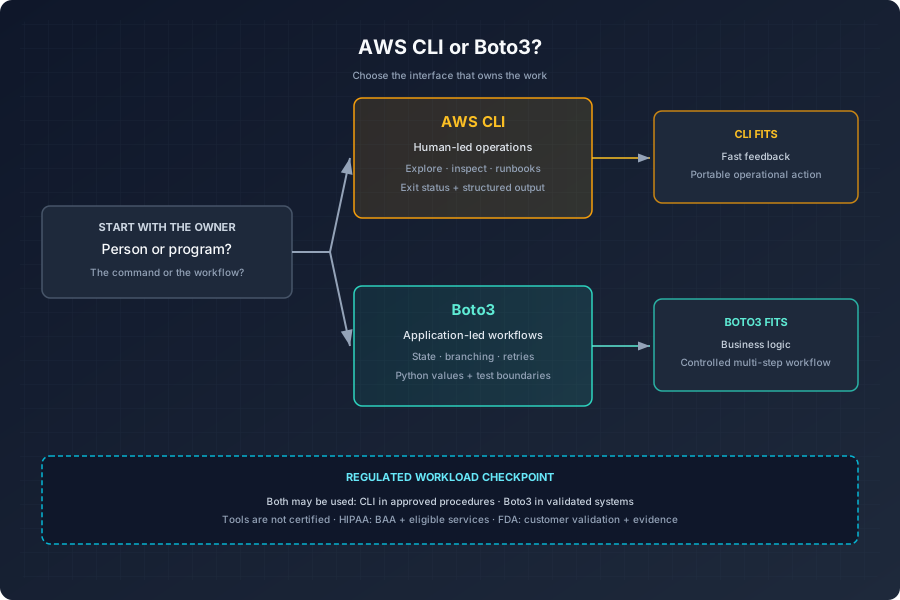
- Who owns the behavior? A person at a terminal or a Python application? Start with the CLI or Boto3 accordingly.
- Is the output for a human or another program? Use table output for inspection, structured output for automation, and native Python values inside Python.
- Will it grow into a workflow? If you need branching, state, recovery, or business rules, move the behavior into Python before the shell script becomes an accidental platform.
- Does the tool have a service-specific higher-level feature? Check the official command reference, paginator documentation, waiter documentation, and service guide.
- How will it authenticate in each environment? Use profiles or IAM Identity Center locally and IAM roles or another supported temporary mechanism in deployed workloads.
- Is the workload regulated? Confirm the BAA and eligible services for HIPAA; for FDA-regulated work, confirm validation, audit trail, records, approvals, and change-control requirements.
- How will failure be observed and tested? Define exit-status behavior for scripts; define exception handling, retries, pagination, logs, and Boto3 stubs for Python.
Final take
The AWS CLI is the best interface when the unit of work is a command. Boto3 is the better interface when the unit of work is a Python program. Both are official clients of AWS APIs, both rely on careful identity and Region configuration, and neither excuses us from understanding permissions, pagination, retries, or failure modes.
My default is to explore with the CLI, codify small operational actions in scripts, and use Boto3 once the workflow has application-shaped logic. That boundary keeps commands readable, programs testable, and the person operating production from having to decode a 400-line shell script named quick-fix.sh.