I have been using Claude Code daily for months now. Early on, I treated it like a fancy autocomplete — throw a prompt, hope for the best, fix whatever came back. The output was inconsistent, the context would drift, and I would burn tokens going in circles.
Then I started being intentional about the setup. The results changed dramatically. Claude Code is not magic — your setup determines the quality of its output. The better you structure the relationship, the more it feels like pairing with a senior engineer who happens to have infinite patience.
Here are the six practices that made the difference. Most of them are inspired by Anthropic's own recommendations, beginning with Mastering Claude Code in 30 minutes.
1. Start with '/init' (or a Hand-Crafted CLAUDE.md)
Think of CLAUDE.md as the onboarding document you would write for a new engineer joining your team — except this time, the new engineer is an LLM.
Running /init generates a starting point, but the real value comes from curating it yourself. The file must cover three things, stated as simply as possible:
- What the project does — one or two sentences, no fluff.
- Where things live — directory structure, key files, where to look for what.
- How work gets done — tech stack, commands (
npm run build,npm test), rules, conventions, and what test coverage is expected.
Brevity is critical here. LLMs lose signal in noise. A 200-line onboarding novel will confuse Claude more than help it. Keep it tight, keep it current, and treat it like living documentation.
2. Plan Before Writing a Single Line of Code
This is the habit that prevents Claude from going rogue on large changes.
The loop is simple: Plan → Implement → Review. Never skip Plan. Hash out what needs to happen together — agree on approach, scope, and boundaries — then implement only what was agreed on. Finally, wire up a review step (more on that in practice #5).
Plan mode in editors (like VS Code's Copilot agent or Claude Code's own planning step) exists to reinforce this. Use it. When you let Claude jump straight to implementation on a complex task, you get sprawling changes that are painful to review and often miss the mark.
3. Use '/clear' Between Tasks
Each task should be a clean session with a fresh token window. Period.
I have burned plenty of tokens when I did not take up this habit. Context from a previous task bleeds into the next one — Claude references old decisions, carries stale assumptions, and produces increasingly confused output as the window fills up.
The rule of thumb is dead simple: new task → /clear → go.
4. Build Slash Commands for Repeated Workflows
Anything I do more than once a week becomes a command now.
Claude supports project-scoped slash commands through .claude/commands/ in your repository. Each command is a markdown file that acts as a reusable prompt template. You invoke them with /project:command-name.
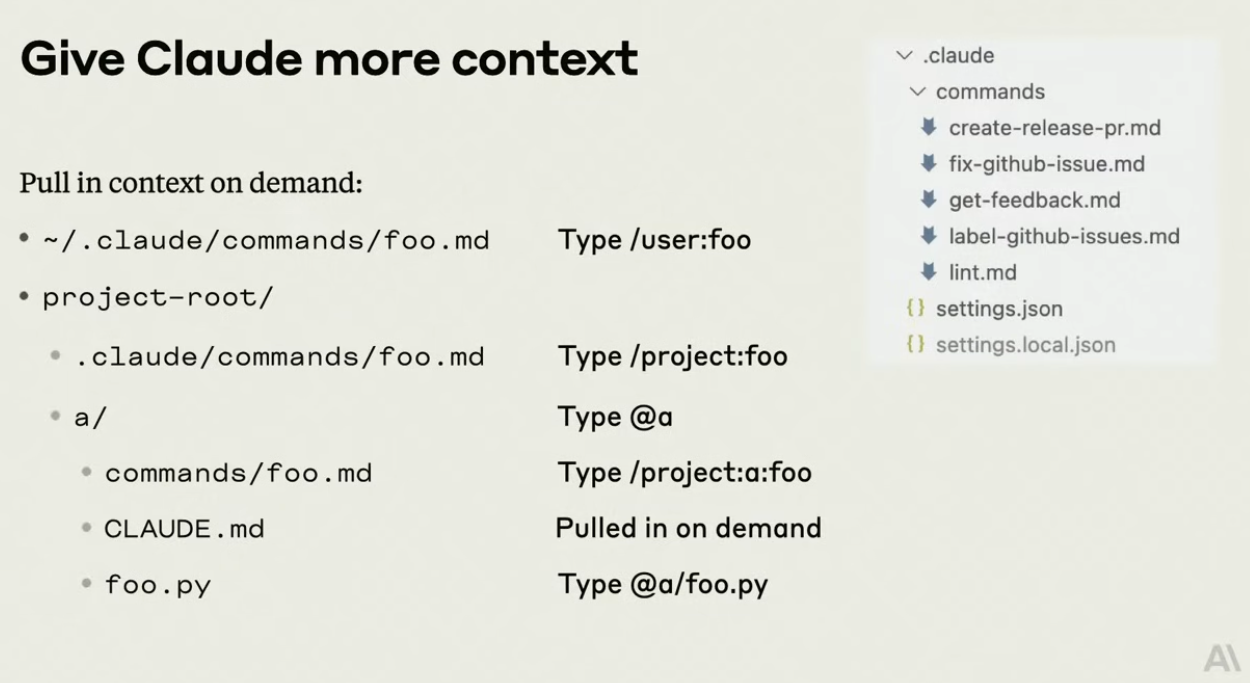
Source: Anthropic — Mastering Claude Code in 30 minutes
The pattern is powerful because it encodes institutional knowledge. Instead of re-explaining your PR process every session, you write it once as a command and invoke it forever. My current set includes commands for creating releases, fixing GitHub issues, getting feedback on implementations, and running lint passes — all tailored to my project's specific conventions.
5. Wire Up a Self-Validation Loop
This is the practice that eliminated the most back-and-forth.
I have three hooks that run automatically after every change, before Claude hands anything off to me. They execute sequentially — if one fails, Claude fixes it before moving to the next:
- Type checker — catches type errors immediately.
- Build step — ensures the project still compiles.
- Tests — confirms nothing is broken.
The key insight is the sequential gating: if the type checker fails, there is no point running the build. Claude fixes the type error first, then proceeds. This keeps the feedback loop tight and means that by the time I see the changes, they already pass the baseline quality bar.
No more "it works on my machine" surprises.
6. Sub-Agents for Isolated Work
When a task is narrowly scoped and self-contained, delegate it to a sub-agent.
Sub-agents operate with their own context window — smaller, focused, and isolated from the main session. This means they do not pollute your primary context with irrelevant details, and they can work on well-defined subtasks without the overhead of your entire project's history.
I am still experimenting with this one, but the benefits are already clear: isolation keeps context clean, the smaller window forces precision, and you can run multiple sub-agents in parallel for independent tasks.
What I Am Exploring Next
There is more to this workflow than what fits in a single post. I am currently experimenting with parallel sessions using Git Worktrees (multiple Claude instances working on different branches simultaneously) and encoding workflows as reusable skills that Claude can invoke autonomously.
On the editor side, VS Code now ships an Agents window — custom agents defined via .agent.md files that scope tools, instructions, and personas for specialized workflows. Claude Code's CLI equivalent is its sub-agent system (the Task tool) paired with /project: commands, though without a visual management layer.
Those deserve their own deep dive — stay tuned.
What is your one non-negotiable practice when working with AI coding tools?